
↰ Back
Parallel Computing for the Home [DRAFT]
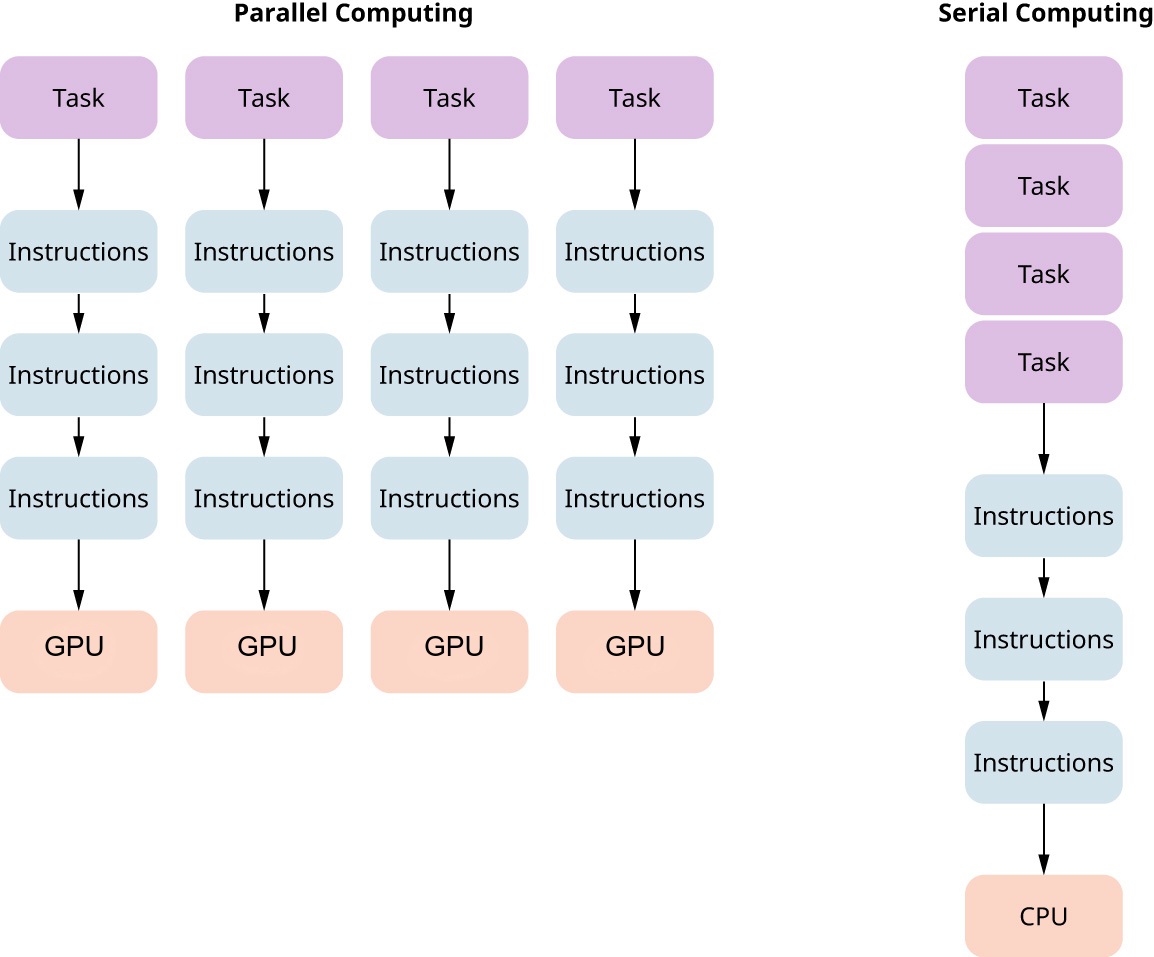
Source: Engineering LibreTexts
Blog: Jun 20, 2026
I am getting back into my parallel computing kick that I got over at CMU. I had access to the Pittsburgh Supercomputing Center (PSC), and that was pretty awesome. The only thing is I didn't really know what to do with all that power.
I got access during a class I had, and they gave me alot of computing power. Which makes sense, we are students, we're bound to mess up and use alot of power. But it was ALOT. By the end of the class, I maybe put in maybe a 1/10 dent into all my allocated resources. So I spent last summer wondering what to do with it all.
I of course asked my friends, and as insightful as they are, I think mining bitcoin is pretty irresponsible on such a powerful machine. So, I looked at my projects, and I found that I could just continue my assignments. One of those was solving the 3 body problem. I was given a bunch of data calculated by BRUTUS, an algorithm that basically calculates the 3 body problem manually (which takes forever), and I wanted to see if machine learning could take a crack at it. Of course, I wasn't the first person to think of that, I had a bit of inspiration . But I just wanted to this for myself. I had done it in class, of course. But I wanted to do it better, since my original code was terrible
I tried to do it better before my compute time expired, you gotta believe me. But it be like that sometimes. I wasn't able to finish.
Ok so then what? Just give up? I mean I could. Thats alot of power I no longer have.
NO !!!!! i can rebuild it . stronger .... better ... with my own two hands ....
jk. well half joking. PSC got like $5 million 1-2 years ago from the NSF and i dont think the NSF will approve me that much "just cause i think itd be cool". But I can do the next best thing. I got some inspiration from the Stone Soupercomputer. Its projects like those I really thing we should bring back for colleges.
So, I called all my friends (yes i have friends) and asked them for all their old GPUs and computing hardware. And thats when I realized that a Stone Soupercomputer would be slightly harder than I thought.
The main issue is that machines and computers and such require alot of power, and you sort of have to parse out which can be used and which can't. Not only this, but many systems are very heterogenous, with different architectures, and different power ratings. But I didn't let that discourage me. Especially because the first step was kind of easy.
Casting the first stone
So I have two NVIDIA 1050 Ti's. Each has a VRAM of 4GB. well, i guess you have to start somewhere. I got them from a couple friends and we can work on it from there.
Tutorial: Using 2 (NVIDIA) GPUs for parallelization
Step One: Connect the 2 GPUs to your computer
There are a couple ways to do this, it depends on your motherboard. The motherboard I had was an MSI 270-a Pro, so I was able to connect both directly on the motherboard like so (Credit to MSI):

The red squares are where I placed the two NVIDIA 1050 TI's. There are a couple of other slots, but that is for PCIe ports, which may also work if you have the proper risers, 1x to 16x. Just remember you have to power them too.
Step Two: Make sure the GPUs show up
I ran this setup on Linux, specifically Linux Mint, and I would reccomend you do too if you care about computational speed. I'm not sure the command on Windows, but I ran this in a terminal:
> nvidia-smi
This should display all of the NVIDIA GPUs on your computer. Hopefully they'll all show up. Here's my output:

Install the proper libraries if needed
To check if your system is already setup to use parallelization, I would reccomend compiling the following program:
#include <stdio.h>
#include <openacc.h>

int main(void) {
    int ndev = acc_get_num_devices(acc_device_nvidia);

    printf("Number of NVIDIA devices: %d\n", ndev);

    for (int i = 0; i < ndev; i++) {
        acc_set_device_num(i, acc_device_nvidia);
        printf("Selected Device: %d\n", i);
    }

    return 0;
}
On Linux, to compile this (and because I prefer gcc over nvc, personally). This tutorial uses OpenACC for parallelization. I saved the file as acc.c and ran:
> gcc -fopenacc acc.c -o acc
The output for me in this case was:
Number of NVIDIA devices: 2
Successfully selected device 0
Successfully selected device 1
But you may not have everything installed, resulting in the program just saying:
Number of NVIDIA devices: 0
So install some of the libraries. I had to install these:
> sudo apt install gcc-13-offload-nvptx
> sudo apt install libgomp-plugin-nvptx1
Begrugingly, I will say that with nvc, this works alot cleaner, and you likely don't have to do this. But be warned that nvc comes straight from the NVIDIA corporation, and I wouldn't get used to their evil ways so quickly.
Step Four: Test out your new setup wahoo yipee
Hopefully, everything has worked out and you are able to finally start using parallelization! Try out the following program:
#include <stdio.h>
#include <stdlib.h>

int main(void) {
    const int N = 10000000;
    float *a = malloc((size_t)N * sizeof(float));

    #pragma acc data copyout(a[0:N])
    {
        #pragma acc parallel loop
        for (int i = 0; i < N; i++)
            a[i] = i * 2.0f;
    }

    printf("%f\n", a[N-1]);

    free(a);
    return 0;
}
This is a program that will test if your setup is working. This would probably take alot to run on just a CPU, as it makes an array containing the first 10 million even numbers. A CPU would run through this one at a time, but a parallel setup should calculate each value in the array in parallel, meaning if this takes a long time, you probably did not set it up right. I saved the code as test.c and compiled:
> gcc -O2 -fopenacc -fcf-protection=none test.c -o test
I include "-fcf-protection=none" mainly becuase it wouldn't work on my system personally without it, but you don't need it if it runs fine without it.
With this, I have my own little supercomputer. Not a particularly good one, but its better than my previous set up, and if I use it right I can get some things done. Here's an example of the speedup I get. I multiplied 2 matrices together, size 2048x2048. Here are the results:

A 253.47 times speedup is not bad. But the old physics addage: "big number times a really really small number is a really really small number". I don't think I am getting to supercomputer speeds just yet. But I am getting there....